






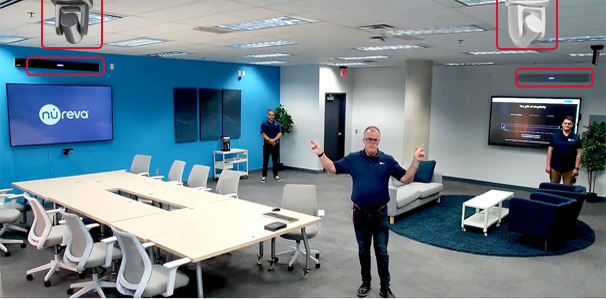
Why is using multiple cameras important?
Today's meetings are no longer just classic discussions viewed from a single angle. With the hybrid work model, the experience of remote users has become just as important as the experience of participants in the meeting roo m.
With single-camera systems, it's often impossible to capture all the details in a room simultaneously. Speakers, whiteboard areas, large table arrangements, or different seating areas may not be clearly visible in the image.
Multi-Camera Experience with Nureva
Nureva systems offer enhanced audio coverage in meeting spaces and can work with multi-camera setups to create a more natural viewing experience.
With the help of the cameras positioned at different angles, speakers, presentation areas, and interactions within the room can be conveyed to the audience from the most optimal perspective.
This structure allows users, especially the remote participants, to be more strongly involved in the meeting.
How to install a multi-camera setup in video conferencing?
To ensure the smooth operation of the multi-camera system, a central multimedia device is used in addition to the Nureva audio solution. Thanks to this structure, audio, video, and camera transitions can be managed from a single center.
The Nureva HDL410 system's connectivity module is integrated into the multimedia device. PTZ cameras are connected to this system via HDMI, USB, or network connections. This allows for automatic camera switching based on the active speaker during a meeting.
Multiple Camera Connection Structure
Basic system architecture
This structure offers a professional experience for video conferencing, remote learning classes, corporate presentation areas, and hybrid meeting rooms.
How are the cameras installed?
Proper configuration is crucial for the effective operation of a multi-camera system. Camera switching, focus adjustments, and system integration can usually be easily managed via a central software or control panel.
The short video below shows step-by-step how to configure camera settings and how the system works.
Camera transitions are automatically optimized based on the speaker.
How to Make Camera Switching Smarter Using Audio Data?
During a video meeting or live lesson, the system uses audio location data to identify which area is active and automatically activates the corresponding camera. This allows remote participants to follow the speaker and the area where the conversation is taking place without interruption.
Furthermore, this approach eliminates the need for additional software and technical setup required in traditional multi-camera solutions. Working in conjunction with the tracking features offered by PTZ cameras, it provides automatic focusing when needed while switching between designated areas.
Benefits of Multi-Camera Systems
A multi-camera system not only offers a variety of images; it also ensures that meetings are clearer, smoother, and more participant-focused.
360° View Experience
The meeting isn't confined to a single angle; the space where the conversation takes place is viewed more naturally and holistically.
Automatic Speaker Focusing
The system detects the active speaker and switches to the corresponding camera.
Geniş Alanlarda Etkin Kapsama
Even in large meeting rooms, every point in the room is displayed accurately.
These advantages become even more apparent in different use cases.
Where are multi-camera systems used?
These advantages become even more apparent in different usage scenarios. Multi-camera systems offer effective solutions not only in large meeting rooms but also in many environments with different needs.
Education and Distance Learning
In environments where the instructor is moving around, a whiteboard is being used, or different points are being explained, a single camera is insufficient. A multi-camera setup allows students to follow the lesson better.
Conference and Seminar Rooms
In presentations held in large venues, the stage and speaker movements can be shown from different angles. This enhances the audience experience.
Boardrooms
In these decision-making processes, the quality of communication is of paramount importance. The use of multiple cameras ensures that meetings proceed in a more professional manner.
Hybrid Work Offices
In hybrid environments where teams working in different locations come together, remote participants are actively involved in the meeting.
Nureva's integrated multi-camera solutions transform meeting rooms from mere spaces into more efficient and interactive experiences.
A properly configured system allows teams not just to come together, but to truly connect.
